Using Food Signals every day
Setup is done. This is the part that actually helps — and it asks very little of you.
The whole habit is: log what you eat, note how you feel. A few seconds, a few times a day. Everything else in the app is built out of those two things.
Finding your way around
Across the top of every screen is a row of six buttons. That row is the menu — it's how you move around the app.
- Today — your home. Quick logging and today's summary.
- Journal — everything you've logged, newest first.
- Tracking — protein and nutrients against your targets.
- Recipes — meal ideas, scored for how you're feeling.
- Settings — your account, targets and preferences.
- Feedback — tell us what's wrong or missing.
Wherever you end up, the menu stays at the top. Tapping Today always brings you home.
Today: where the day starts
Open the app and you land here.
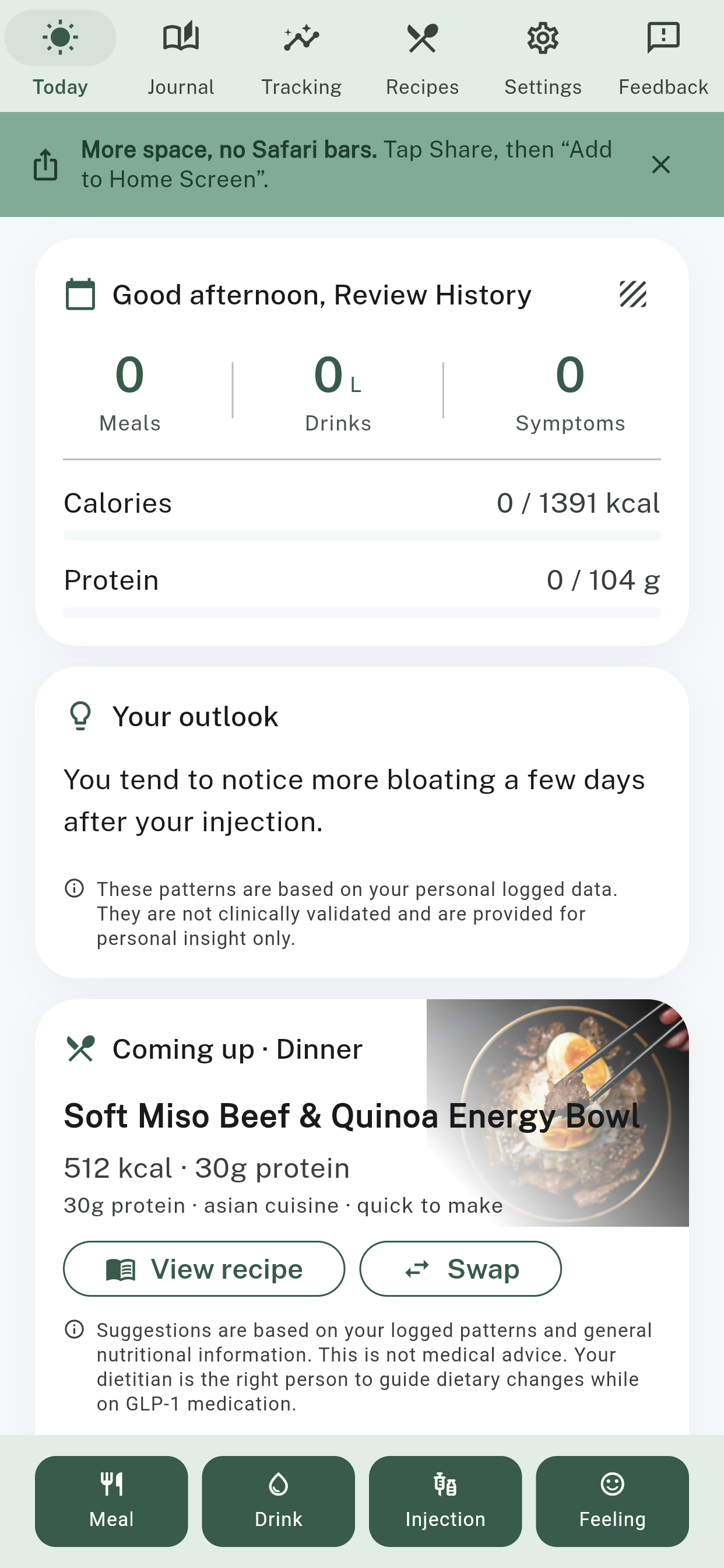
The four dark green buttons sit along the bottom of the Today screen — Meal, Drink, Injection and Feeling. They're within thumb's reach on purpose, because they're the ones you'll use every day. Everything above them is there to be read, not tapped.
Log a meal
Tap Meal at the bottom of the screen. You can take a photo of what's on your plate, type a few words to describe it, or repeat something you've eaten before.
Write it the way you'd say it out loud — "chicken noodle soup, plain crackers" is a perfect entry. You don't need to weigh anything or look up any numbers. The app works out the nutrition from your description.
Log what you actually ate, not what you meant to eat. Half a piece of toast is real, useful information. A day where you managed almost nothing is worth logging too — those are often the days that explain the pattern later.
Log a drink
Tap Drink to add water as you go. Staying hydrated gets harder when your appetite drops, and this keeps a running tally through the day.
Log an injection
Tap Injection once a week, when you take your dose.
Food Signals records only two things: when you took it, and whether the dose was new, the same, higher or lower than last time. It never records the name of your medication or how much you took.
That timing is what lets the app line up your symptoms against where you are in your weekly cycle.
Log how you're feeling
Tap Feeling and note what's going on — nausea, tiredness, bloating, whatever's true — and how strong it is.
This is the half of the picture most people skip. Meals alone can't tell you much. Meals plus how you felt is where the value is.
The rest of the Today screen
Above the green buttons, three cards read back what you've told the app.
The summary card — the one that greets you by name — counts your meals, drinks and symptoms, and shows your calories and protein so far against your daily target.
Your outlook is a plain-English note about what your own logs tend to show — something like "You tend to notice more bloating a few days after your injection." It's drawn from what you've logged and nothing else. It isn't a prediction, and it isn't a diagnosis. It's a nudge to plan around.
Coming up suggests one recipe for your next meal. Tap View recipe to see it, or Swap if it doesn't appeal today.
Journal: everything you've logged
Tap Journal in the menu along the top to see your day as a single list, newest first — meals, water, symptoms and injections together.
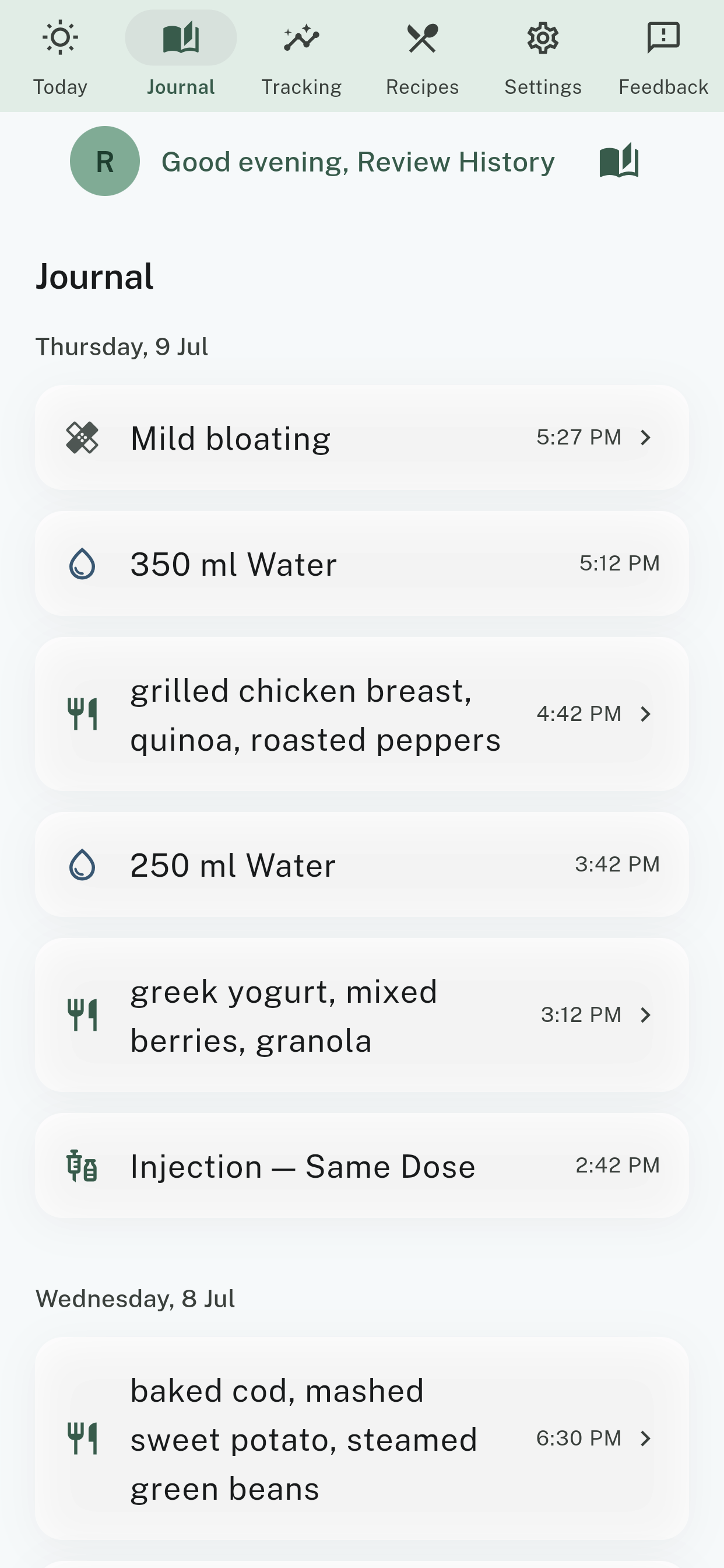
Seeing them side by side is the point. When a rough afternoon sits a few lines below what you ate at lunch, you start to notice things.
Made a mistake? Tap any entry to open it, then change it or delete it. Forgot yesterday's dinner? Add it now — you can log for a day that's already passed.
Tracking: am I getting enough?
Tap Tracking. This is the answer to the question that worries most people on a GLP-1: am I actually eating enough, and enough of the right things?
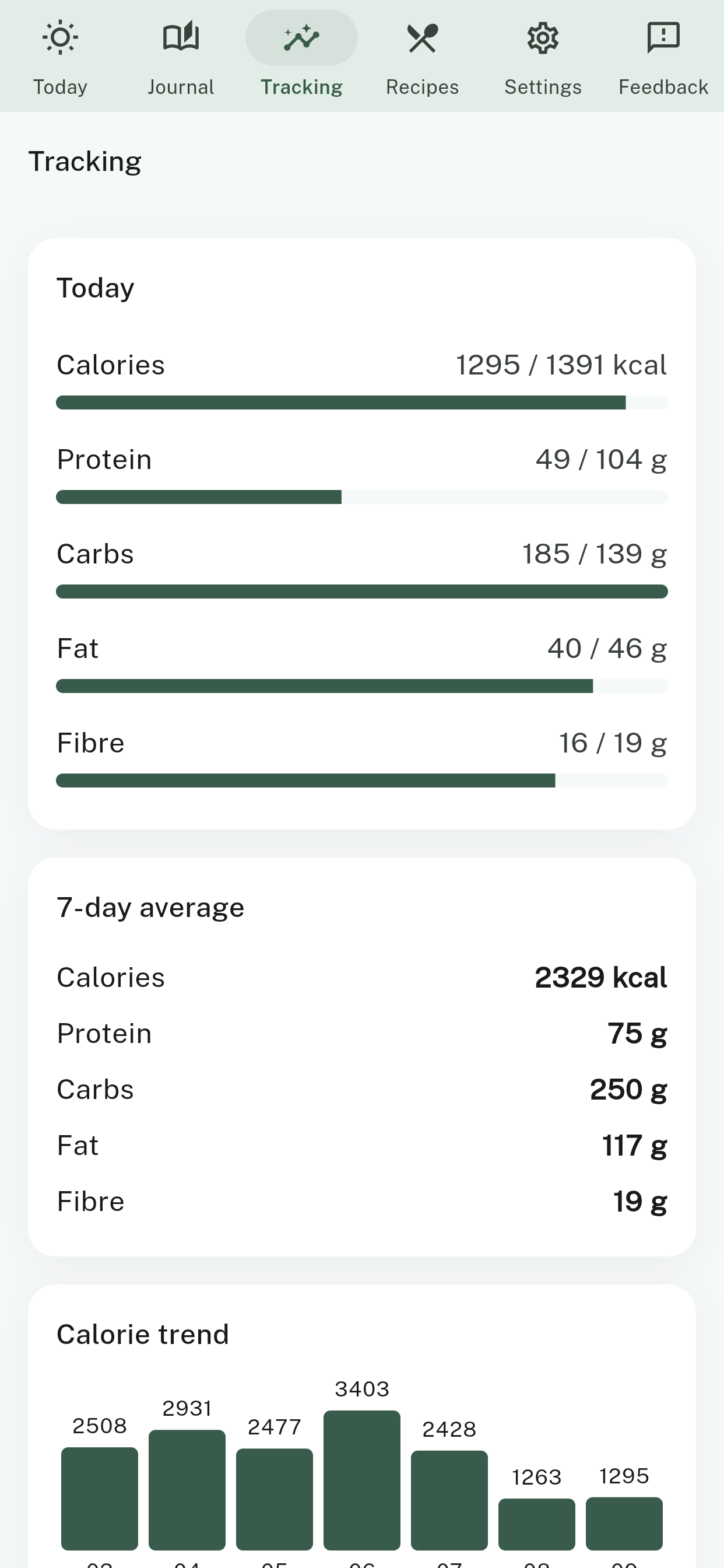
Today shows calories, protein, carbs, fat and fibre against the targets set during your setup.
7-day average is the more useful number. Everyone has low days. What matters is the shape of the week, and the average tells you that where a single day can't.
Calorie trend draws your recent days as bars, so a rough day is easy to tell apart from a rough fortnight.
If your protein is consistently short of your target, that's worth raising with your dietitian. It's exactly the kind of thing this screen exists to surface.
Patterns: what your logs tend to show
On the Today screen, look at the card that greets you by name. In its top-right corner is a small striped square. Tap it to open Patterns.
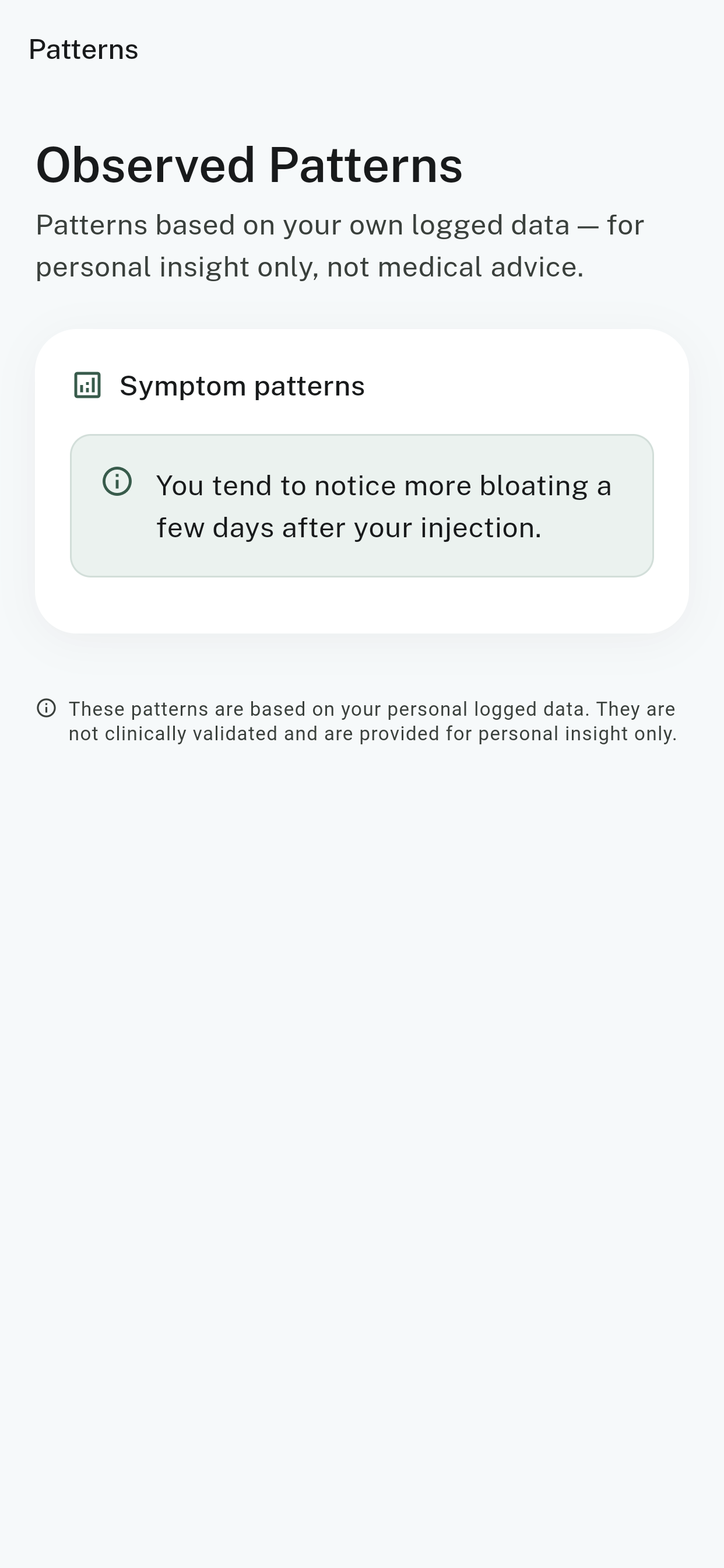
These are observations from your own data. They aren't clinically validated, they don't diagnose anything, and they aren't predictions about what will happen. They're a way of noticing what you might not have noticed on your own.
They're also excellent to bring to an appointment. "I tend to get more bloating a few days after my injection" is a far more useful thing to tell your dietitian than "some days are bad."
Patterns need data. Nothing much will show up in the first few days. Log for a week or two and the picture starts to fill in.
Recipes: what to eat when you don't want to eat
Tap Recipes. Every recipe carries a Food Signals Score out of 100 — how well it tends to be tolerated on a GLP-1 — plus separate scores for nausea, low appetite, fatigue, bloating and constipation.
Filter for whatever is bothering you today, and pick from the meals that score best for it. If you're queasy, sort for nausea. If you can't face a full plate, sort for low appetite.
No recipe scores well on everything, and that's deliberate. The separate scores are there so you can choose what matters most to you today.
The recipes already respect the allergies, restrictions and dislikes you entered during setup.
How the Food Signals Score works →
Settings: changing your mind
Tap Settings to adjust anything you set up earlier.
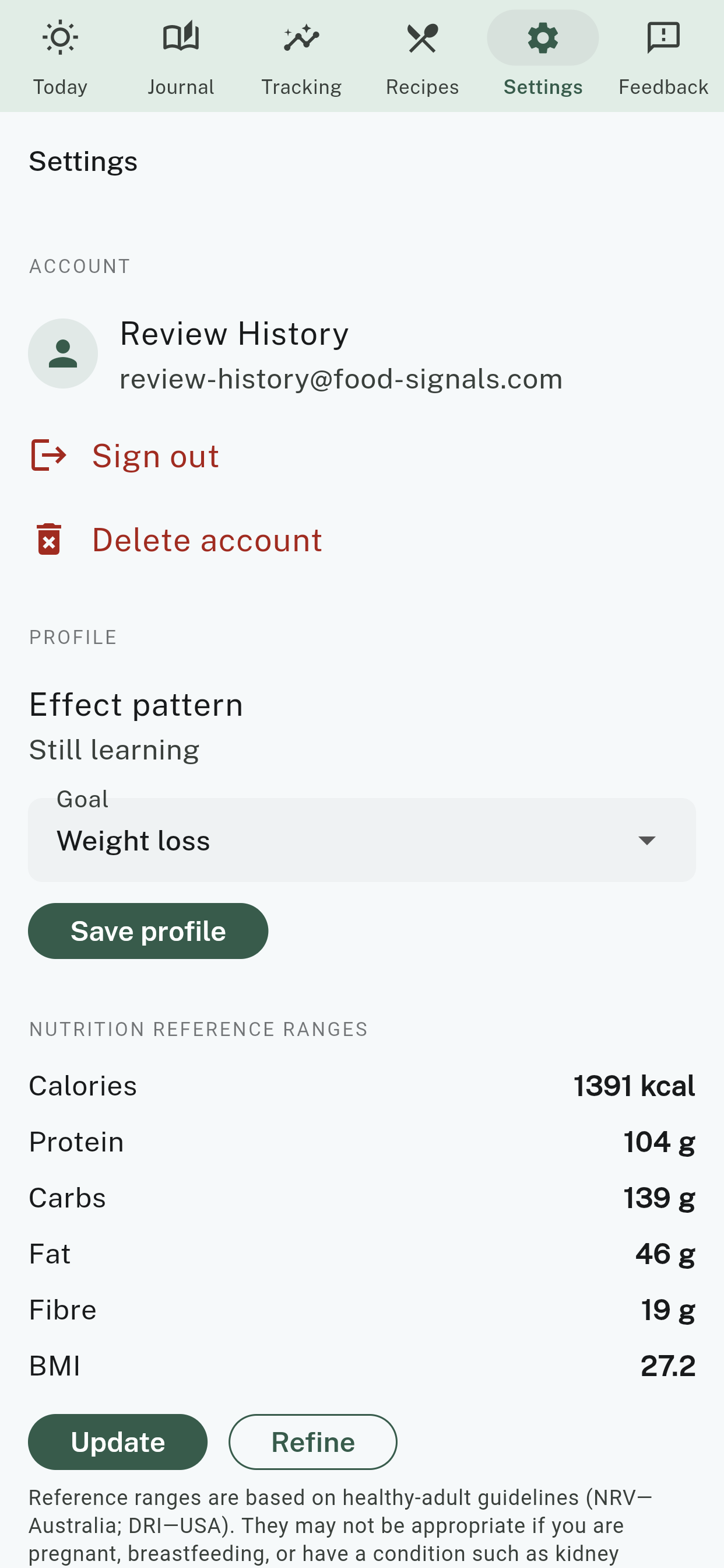
- Goal — what you're working towards. Tap Save profile after you change it.
- Nutrition reference ranges — your daily targets. Tap Update to re-enter your details, or Refine to adjust the numbers directly.
- Sharing with the dietitian — turn it on or off whenever you like.
- Sign out — for when you're on someone else's phone.
- Delete account — removes your data. Done within 30 days, confirmed by email.
Things change on a GLP-1. Your appetite in month four is not your appetite in week one. Coming back here every so often to update how food feels for you keeps the app's suggestions worth having.
Your first week
You don't need to do all of this. But if you'd like a shape to follow:
- Day one. Log one meal. Just one. That's a complete success.
- Day two. Log your meals, and tap Feeling once — even if the answer is "fine".
- Day three. Add your water as you drink it.
- Injection day. Tap Injection when you take your dose.
- End of week one. Open Tracking and look at your 7-day average protein.
- End of week two. Open Patterns. Something will have started to show.
Small, steady steps beat big, unsustainable changes. A missed day is not a failure and there's nothing to catch up on. Log the next meal and carry on.
If something goes wrong
"I can't find the app." It lives at portal.food-signals.com in your phone's browser. Add it to your home screen and it's one tap from then on — we show you how here.
"I forgot my password." On the sign-in screen, tap Forgot password? Reset here.
"I logged the wrong thing." Open Journal, tap the entry, and change or delete it.
"The nutrition numbers look wrong." The app estimates from your description, so it isn't perfect. If something looks badly off, tap Feedback and tell us — that's how it improves.
"Something's broken." Tap Feedback in the menu at the top of any screen, or email [email protected]. During the closed trial your message goes to a small team, and Ruby reads along.
Food Signals provides general dietary information based on nutritional science and GLP-1 tolerability research. It is not a substitute for professional medical advice, diagnosis or treatment, and it does not diagnose, treat or prevent any condition. Always consult your prescribing doctor, pharmacist or registered dietitian before making dietary changes while on a GLP-1 medication. Do not use this site or app to make decisions about your medication.